
Analyst’s Guide: Querying Morpho BlueVaults on Idle Liquidity

Over the past three weeks, I’ve been working on an analysis of the Level Finance protocol, like the image you see above.
And it’s dawned on me that querying lending and borrowing markets on Morpho via Dune can be daunting, a little frustrating, and also quite exciting.
The Analysis on the LevelUSD protocol was to look at the utilisation of lvlUSD and slvlUSD alongside other insights across Defi use cases like Pendle, Morpho, Curve, and Spectra.
You can find the complete dashboard here: https://dune.com/0nchainlabs/level-lvlusd-dashboard
While working on the utilisation of lvlUSD and slvlUSD on Morpho, my first scope was to analyse the lvlUSD and slvlUSD associated vaults: M11C Level lvUSD vault and Steakhouse Level USDC vault, and then query the Total Value Locked (TVL) or Total Deposits in both vaults.
Morpho, for those unfamiliar, is a permissionless lending protocol on Ethereum that allows curators to create optimized vaults for lending assets like lvUSD (a synthetic stablecoin from Level Finance) and USDC.
So I began with a common approach, calculating net flows from deposit and withdrawal events, but ran into issues when the figures didn’t match the vault’s displayed stats on the Morpho app on the Steakhouse Vault.
It was strange, the same query was working great with near-matched results on M11C Vaults; however, the Steakhouse vault was showing something I’d never seen before, which is Idle Liquidity.
Since these are new waters for me, I started reading up on them, and Andrew Wong’s resources were invaluable in understanding what this means, as well as the right logs to decode and query to achieve my desired result.
And in this article, I’ll walk you through both methods I used, how I applied them, and I’ll include exact SQL queries I used on Dune Analytics and the data outputs from my runs at the time.
Let’s Understand What Idle Liquidity Means from a Data POV
Press enter or click to view the image in full size
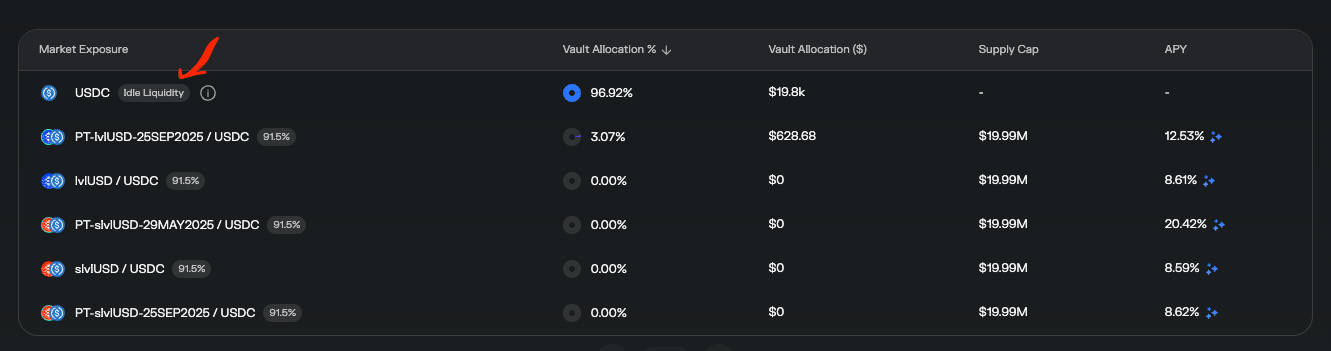
In the context of Morpho vaults (like the USDC shown in the screenshot, which appears to be on Steakhouse Vault on Morpho Blue), “Idle Liquidity” refers to the portion of the vault’s total deposited assets that is not currently allocated or lent out to any active markets or external protocols.
Instead, these assets are held directly in the main vault contract as a readily available buffer. This ensures quick access for user withdrawals and provides flexibility for the vault’s curator or allocator to deploy capital strategically without immediate risk exposure. Why is this important?
Separation of Assets: Morpho Vaults v2 explicitly distinguishes between idle liquidity (unallocated capital) and allocated capital (assets supplied to yield-generating markets via adapters).
All user deposits start as idle liquidity in the vault contract. The vault’s allocator can then move portions of it to specific markets (e.g., the PT-lvlUSD-25SEP2025/USDC in the screenshot, which has a 3.07% allocation).Conservative risk management: The vault’s curator sets caps (absolute or relative) on allocations to limit exposure to certain collaterals or markets, leaving more assets idle to avoid volatility or potential bad debt.
Liquidity prioritization: To handle potential withdrawals without needing to pull funds from illiquid positions.
Market conditions: If yields in available markets are low or risky, the allocator might hold back deployment.
In USDC Markets specifically, here, USDC is the loan token (the asset being lent). Idle liquidity in these markets represents USDC deposits not yet supplied to borrowers against collaterals like PT-lvlUSD, IvUSD, or slvUSD.
Which means it’s essentially “parked” USDC, earning no yield, contrasting with allocated portions that generate interest from borrowers.
No doubt this is really normal with Defi Lending and Borrowing. But from a Data POV, it completely changes how you approach analysing this vault because this changes the whole outlook of your results. Here’s what I mean.
The Setup: My Querying Experience
I was analyzing the M11C Level lvUSD vault and the Steakhouse Level USDC vault. Where, at the time I was writing this, the Morpho app showed TVL values of about $395.50k for M11C and $20.43k for Steakhouse.
These are ERC-4626-compatible vaults, meaning they emit standard events for deposits, withdrawals, and state updates, making them queryable via Ethereum logs.
I started with Method 1: Summing all historical deposits minus withdrawals to reconstruct the TVL. This seemed logical, like tallying a bank ledger.
I wrote a SQL query to pull Deposit and Withdraw events, extract the asset amounts (scaled by 1e6 for USDC/lvUSD decimals), and compute the net.
Here’s the exact query I ran for the Steakhouse vault:
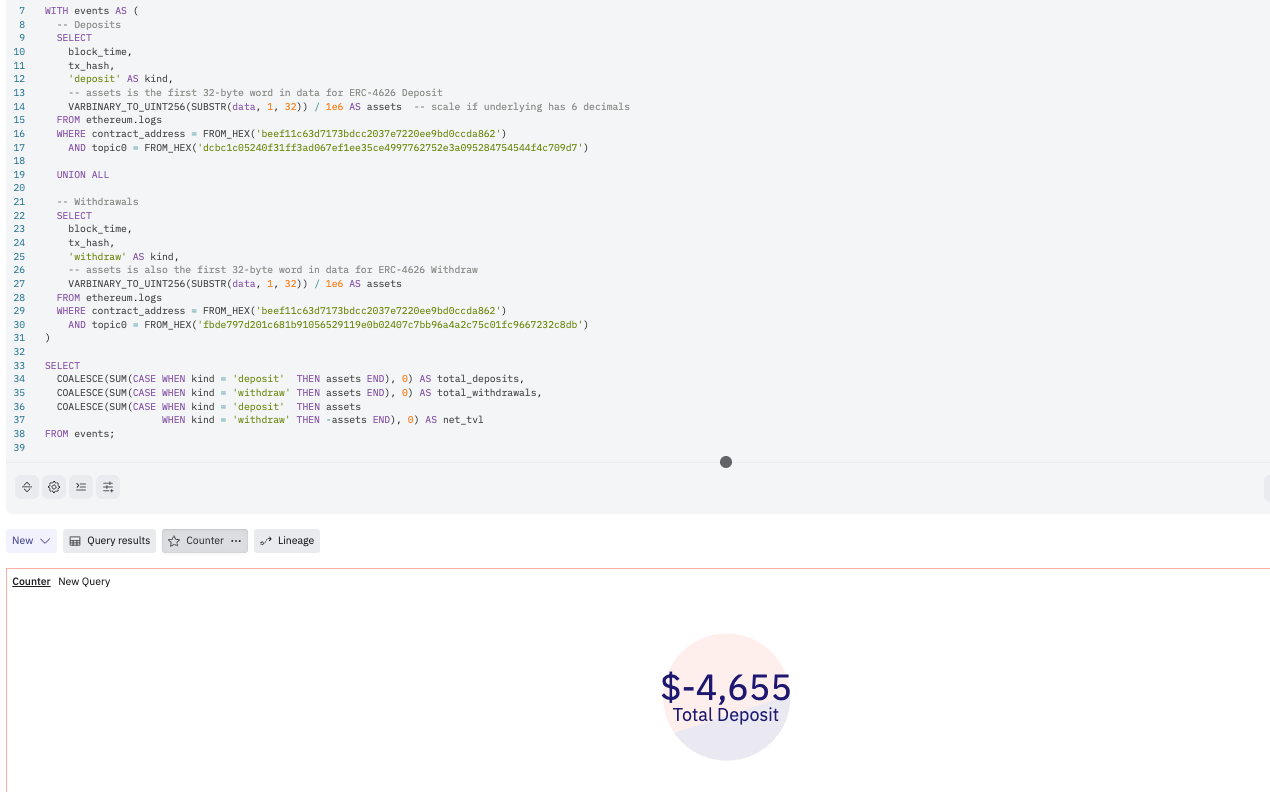
But wait, these results didn’t match the Morpho app’s $20.43k!
Press enter or click to view the image in full size
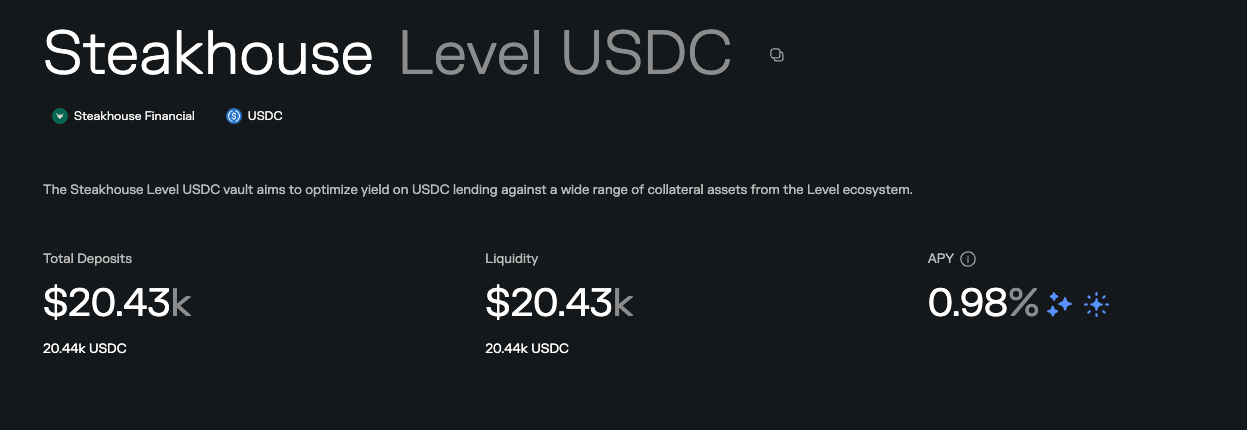
Snapshot from a Morpho Steakhouse Vault
Was the query wrong? No. What about the logic? Also No. So why? Why is this result negative?
Well vaults like these accrue interest, take fees, and rebalance assets internally (e.g., lending out to Morpho markets), which aren’t captured in simple deposit/withdraw events.
Also, remember the Idle Liquidity? Yeah, at this point, that liquidity is in the vault, but there’s been no deposit/withdrawal events to account for it because it is Idle.
Hence, the query and logic of method one would work. Thanks to some resources (actually, Andrew Wong's resources), I noticed recurring UpdateLastTotalAssets events in the log on all transaction receipts.
And found out that these events are emitted whenever the vault’s total assets change, not just from user actions but also from internal updates like interest accrual or reallocations.
This event directly logs the absolute current total, like a bank’s official balance statement. Switching to this (Method Two) fixed everything.

All I did was leave the deposit/withdrawal event. Decode the UpdateLastTotalAssets events instead (as shown below). And decoding the data column using varbinary_to_uint256 to find the total_deposits. Doing this is simply you querying the state snapshot.
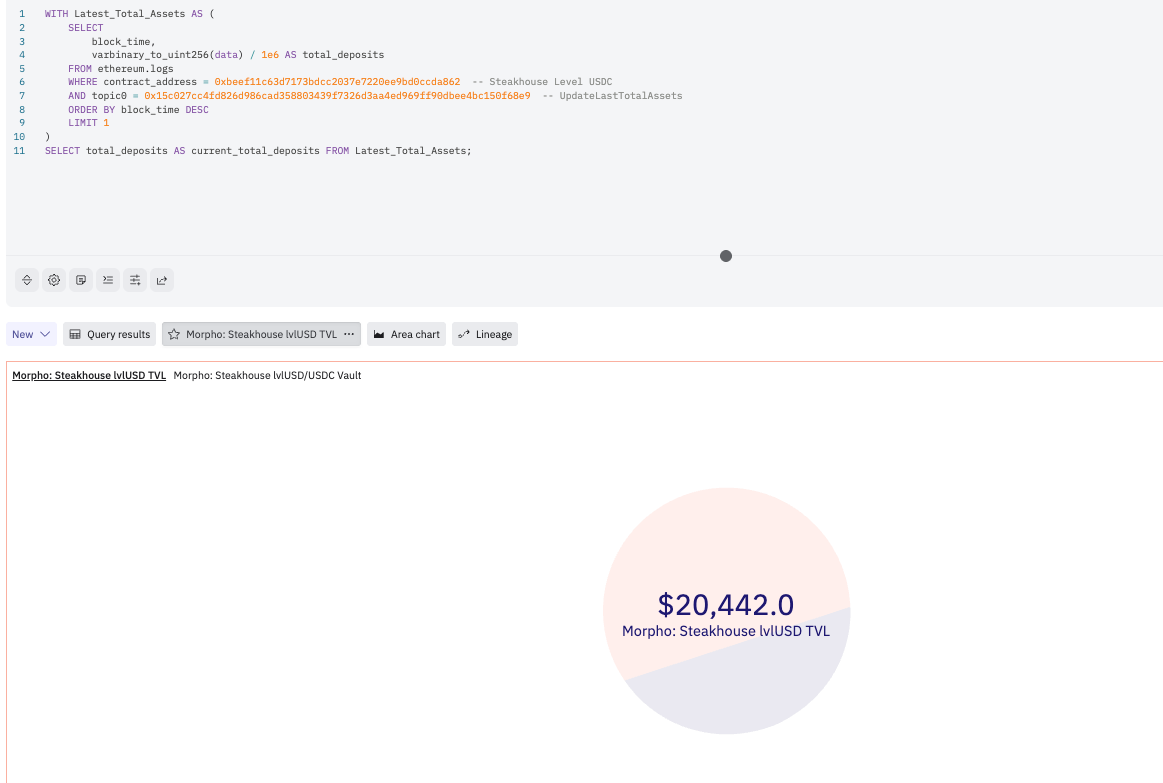
The Two Methods: Net Flows vs. State Snapshot
There are two primary ways to query TVL in a Morpho vault using Ethereum logs, as I have shown above:
- Method 1: Net Flows (Sum Deposits Minus Withdrawals)
How to Do It: Aggregate all Deposit and Withdraw events from the vault’s inception. Extract the assets field from the data blob (first 32 bytes), scale by decimals (1e6 for USDC/lvUSD in this case), and compute the net.
Differences from Method 2: This reconstructs TVL historically, treating the vault like a flow-based ledger. It ignores internal adjustments (e.g., interest from lending in Morpho markets or curator fees).
- Method 2: State Snapshot (Latest UpdateLastTotalAssets Event)
How to Do It: Query the most recent UpdateLastTotalAssets event. The data field is the raw totalAssets uint256, divided by 1e6 for a readable value.
Differences from Method 1: This uses the vault’s internal state update, which is emitted on every change (user actions, accruals, rebalances). It’s an absolute value, not a reconstruction.
Which is Better? Pros and Cons
In my experience, at least from this experience, which has cost me literally the whole day. Method 2 (State Snapshot) is far superior for current TVL queries.
It’s what I will now use exclusively for dashboards and monitoring. Here’s why:
Pros of Method 1 (Net Flows):
Great for historical analysis or auditing flows over time (e.g., track user behavior or net inflows monthly).
Transparent: You see every transaction contributing to the total.
Useful for understanding patterns, like in my 30-day activity query, where I saw deposits of ~$52.8k outweighing withdrawals.
Also very great for seeing granular data,
Cons of Method 1:
Error-prone: Misses non-user changes like interest (via AccrueInterest events) or reallocations, leading to mismatches (e.g., my negative TVL issue).
Computationally heavy: Summing thousands of events can hit query limits on platforms like Dune.
Inaccurate for live monitoring: Vault balances “suddenly” change without new deposits/withdrawals, making the figures wrong quickly.
Pros of Method 2 (State Snapshot):
Reliable and accurate: It’s the vault’s own accounting — includes everything (deposits, withdrawals, interest, fees, rebalances).
Efficient: Just one event to query, fast for real-time use.
Matches official sources: Aligned perfectly with the Morpho app stats in my tests.
Cons of Method 2:
Less granular: Doesn’t show historical breakdowns without querying multiple events.
Relies on event emission: If the vault stops updating (rare, but possible in bugs), it’s stale, although Morpho vaults are updated regularly.
Overall, Method 2 is better for 90% of use cases, especially current TVL, where you need to also account for vaults with Idle Liquidity, which you could miss using Method 1.
Still, Method 1 shines for forensics or trends, but requires supplementing with AccrueInterest to account for yields, which is also very important


